AT A GLANCE
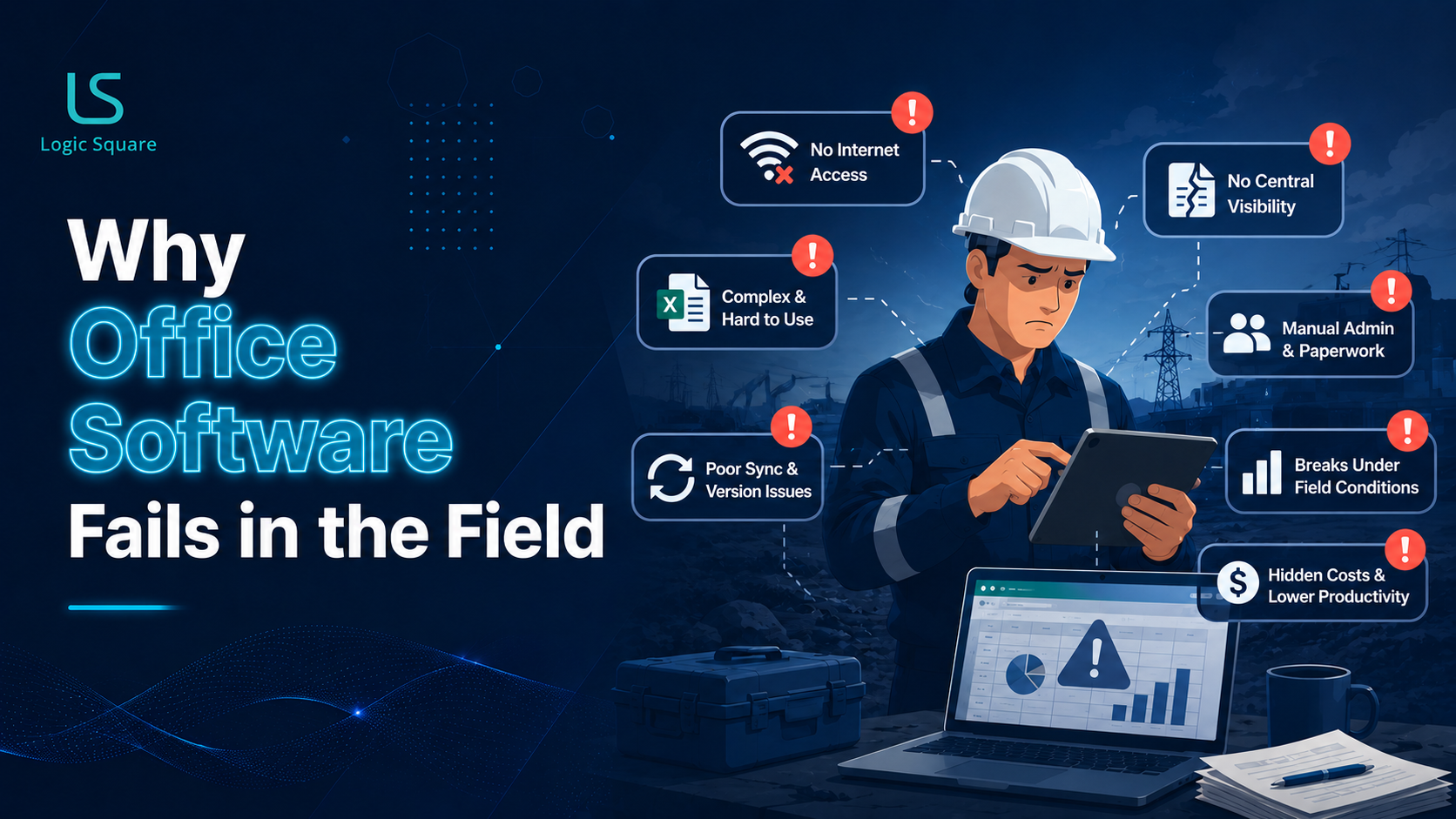
Software built for desks tends to fail in the field. Construction, logistics, utilities, and multi-site service work happen where connectivity is unreliable, the user is on a phone in a truck or a trench, and the operating conditions look nothing like an office. Software for these environments has to work offline and sync later, fit the reality of a mobile crew rather than a desktop user, centralize coordination across crews and locations, and increasingly use AI to remove administrative bottlenecks like photo verification and closeout paperwork.
Below is what that actually requires, drawn from building SpliceOps, a platform for fiber contractors.
Table of Contents
ToggleThere’s a particular kind of software failure that only shows up away from a desk. The tool works perfectly in the demo, in the office, on strong wifi. Then it goes into the real world, a crew in a trench, a technician in a basement, a truck on a rural route and it falls apart because it was designed for conditions that do not exist where the work actually happens.
Building SpliceOps has made the gap between office software and operational software very concrete. Here’s what work in the field actually demands and why so many office-oriented tools break the moment they leave the building.
1. It Has to Work When the Connection Doesn’t
The biggest difference is simple: real-world operational work happens where connectivity is unreliable or absent.
Office software assumes a steady connection and degrades badly without one. Software used in the field has to assume the opposite, let crews continue working offline, store activity locally, and sync automatically when a connection returns.
If a technician cannot log work in a basement with no signal, the software has failed at the exact place it was needed.
Offline-first is not an enhancement in these environments. It is the foundation.
2. It Has to Fit a Phone in a Glove, Not a Desktop
The user is on a phone, often one-handed, sometimes wearing gloves, frequently in a hurry, and occasionally working in bad weather.
An interface designed around a mouse, keyboard, and large monitor becomes actively hostile in that context.
Operational software has to reflect how the work physically happens:
- fast capture,
- large touch targets,
- minimal typing,
- photos instead of forms,
- workflows that can be completed quickly under pressure.
The design constraint is not aesthetics. It is whether the crew can actually use the software without slowing down the job.
3. It Has to Centralize Coordination Across Crews and Sites
Operational work is inherently distributed:
- multiple crews,
- multiple locations,
- simultaneous activity,
- no single person with direct visibility into everything happening.
Without a central operating view, coordination falls back to phone calls, spreadsheets, screenshots, and end-of-day catch-ups. Leadership loses real-time visibility into what is complete, what is blocked, what is delayed, and what is ready to bill.
This is where software earns its place.
The value is not just digitizing tasks. It is creating a live operational picture:
- who is where,
- what work has been completed,
- what approvals are pending,
- where issues are emerging,
- and how the day is progressing overall.
For many operational businesses, that visibility becomes the difference between scaling and remaining dependent on tribal knowledge.
4. It Has to Remove Administrative Bottlenecks — Increasingly With AI
The expensive bottlenecks are often not in the physical work itself. They sit in the administrative layer around it:
- verifying field photos,
- assembling closeout documentation,
- generating invoices,
- chasing approvals,
- compiling updates,
- manually reviewing repetitive operational data.
These are exactly the places where automation and AI are now genuinely useful, and where we have focused significant engineering effort inside SpliceOps.
In practice, that looks like:
- AI-based photo verification that checks uploaded images for clarity, location, and required elements before routing only exceptions to a human reviewer,
- one-click project closeouts that generate customer documentation, invoices, and handoff packages after final approvals land,
- AI-generated project summaries and operational digests,
- and a voice-driven assistant that lets a field user retrieve information or complete actions without navigating complex screens.
The pattern is consistent with how we think about AI more broadly: it should remove manual friction and accelerate operational throughput, while consequential decisions remain with people.
In environments where paperwork and coordination overhead are massive, that creates meaningful leverage.
5. It Has to Be Reliable, Because the Field Is Unforgiving
Everything above only matters if the software is dependable.
A crew cannot stop work to debug an application in the middle of a job. If the system fails, the operation immediately falls back to paper, text messages, or memory — and that data rarely returns cleanly to the system afterward.
Software used in the field has to be built for messy operational reality:
- unstable connections,
- interrupted sessions,
- inconsistent environments,
- device variability,
- edge cases that never appear in controlled demos.
Reliability is not a secondary feature in these systems. It is part of the product itself.
Frequently asked questions(FAQs)
They assume steady connectivity, a desktop interface, and clean conditions — none of which exist in the field. A tool that needs a stable connection and a mouse is hostile to a crew on a phone in a trench. Field software has to be designed for the opposite of office conditions.
It means the software works without a connection — capturing work locally and syncing when a connection returns — rather than breaking when signal drops. In field operations, where crews routinely work in low- or no-signal places, it’s foundational, not optional.
It attacks the administrative bottlenecks: automatically verifying field photos and routing only exceptions to humans, generating closeout paperwork and invoices, producing project summaries, and powering a voice assistant for hands-busy field users. It removes manual friction while leaving consequential decisions with people.
SpliceOps is a field operations platform for fiber contractors that Logic Square is building — covering field workflow, photo verification, project closeout, and embedded payments. It’s a product story we can speak to directly because we’re engineering it, with its first paying customer expected in 2026.
Running Operations on Tools Built for a Desk?
At Logic Square, we build operational software for environments where reliability, mobility, and real-world conditions matter:
- offline-first architecture,
- mobile-first workflows,
- operational visibility across crews and sites,
- and automation that removes administrative bottlenecks instead of adding more process.
Our work spans operationally complex industries where software has to function beyond controlled office conditions — including construction, utilities, telecom, logistics, and distributed service operations.
If you are evaluating a new platform, modernizing legacy workflows, or trying to close the gap between office systems and field execution, we are happy to discuss the operational realities the software has to survive long before the demo ends.